
Personal AI Video Assistant
ViralMint's assistant watches the creators you follow, sends a short daily note on what's worth your time, and plans your next short as a free draft.
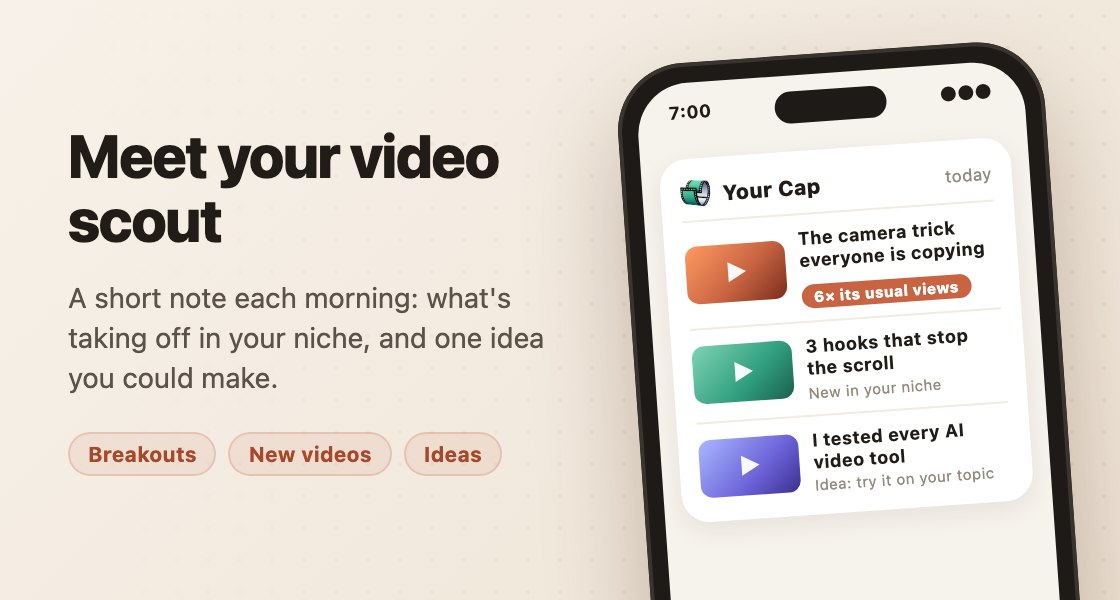
What the assistant does
The assistant is the part of ViralMint that works when you aren't in the app. Each day it reads what's new on the YouTube and TikTok creators you follow, picks what's worth your time, and sends a short note, called a Cap, by email or Telegram. Each item says why it was picked, and a breakout, a video running well above that creator's usual numbers, gets a line of its own.
The note is also a conversation. Reply in your own words and it answers from the same table of things it can do: find videos on a topic, summarize a link, say what's breaking out, tell you what to make next, or plan a short. It reads ordinary sentences, so "more like #2" and "less crypto" work as written, and you can ask in any language.
How it works, day to day
- Tell it what you're about. Pick a niche or two, connect YouTube to use your own subscriptions and likes, or add TikTok creators by @handle.
- Read your note. One to five items a day or a week, at the hour you choose. Quiet days get a short line instead of filler.
- Reply to steer it. "More like that", "no more golf", "only on Tuesdays" or "pause". It adjusts what it sends next, and it remembers.
- Ask it for a short. Say the idea or point at a Cap item. It writes a free draft with the shots and the price, and nothing is made or paid until you press Render.
- Finish it in a studio. The draft opens on the web, where the director, Video Studio and the other tools carry it to a finished mp4 you download and post yourself.
What it learns, and what you control
A profile you can read
Your Creator Wiki lists your niche, your taste lines and what you don't want. Ask "what do you know about me", or remove any line from Settings.
Your schedule, your amount
Daily or weekly, the hour and days you pick, and one to five items per note. Pause it with a reply and resume it the same way.
Blocks that stick
"Never send me crypto" keeps a topic or a creator out of your note for at least six months, and you can lift it any time.
Your data, your call
YouTube access is read-only, and the app reads subscriptions and likes, nothing else. Export or delete everything from the assistant's privacy section.
Honest about its limits
It doesn't post or upload, doesn't delete files, can't change your account, and won't claim a change it didn't make.
The same account as the app
Plans it writes open on the web app. With the desktop app open and your own Telegram bot connected, messages can also download a link or run tools on your Library.
What's a Cap, and why a note instead of a dashboard
A Cap is ViralMint's name for the assistant's short note. It exists because most creators don't need another dashboard to check; they need one thing that arrives and says what's worth doing today. The note points at real videos with the reason each one was chosen, so you decide whether to act and what to make from it.
Frequently asked
What is a personal video assistant?
A personal video assistant is software that follows the creators you watch, learns your taste and tells you what to make next, then helps you write and make it. ViralMint's assistant sends a short daily note by email or Telegram, answers replies, keeps a profile you can read and edit, and plans shorts as free drafts. The studios in the web and desktop app then make the video with you.
Can the assistant make and post a video for me?
It can plan one. Ask for a short and it writes a free draft you open on the web, with the shots and the price on the page; you press Render when you're happy. Making a paid video straight from a message isn't built, and ViralMint never posts anywhere: you download the mp4 and upload it yourself.
What does the assistant cost?
It's free for 14 days from when its emails can start, and the first note is always free. After that each full daily note costs 1¢ from your prepaid balance, and quiet-day notes are free. Replies, plans and summaries in chat are free, within daily limits such as 3 short plans, 5 video searches and 20 link summaries. It pauses when your balance runs out.
Which channels does it watch?
The creators you choose. Pick a niche to start from a curated channel list, add up to two more niches, or connect your YouTube account so it can read your subscriptions and likes, read-only. You can add TikTok creators by @handle or link. Say "less crypto", "block that channel" or "stop watching @name" at any time.
Does it need the desktop app?
No. The daily note, replies and short plans work from email, Telegram and the web app. With the desktop app open and your own Telegram bot connected in Settings, messages can also download a link or run tools on a video in your Library.
Can I turn it off or delete what it knows?
Yes. Pause it by replying, unsubscribe from any email, or turn it off in Settings. Your Creator Wiki shows what it has learned and lets you remove any line, and Delete everything in its privacy section removes your assistant data. Disconnecting YouTube deletes that data within 7 days.
Start with one note a day
It comes with your ViralMint account. Pick a niche, read the first note, and reply when you want something from it.