
Make a Talking-Head Video With AI
A presenter delivering your script — generated with lip-synced speech, or narrated in your own cloned voice.
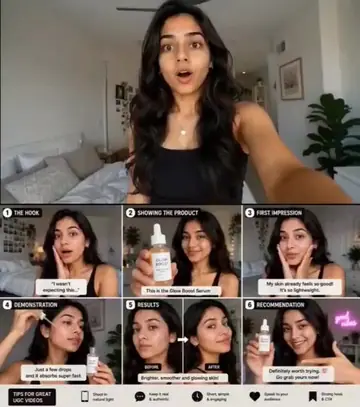
An AI talking-head video is presenter-style footage — a person speaking to camera — generated from a text prompt rather than filmed. Two approaches work today: audio-native video models (Veo 3.1, Sora 2) generate the person and the lip-synced speech together from a script line, or you generate the visuals and lay your own narration on top — including a clone of your actual voice via ViralMint's on-device voice cloning (the reference audio never leaves your machine). ViralMint is a free, open-source desktop app that supports both routes on prepaid credits, then handles captions, music and per-platform export in the same pipeline. The talking-head prompts below are from the free prompt libraries and link to full settings.
How to make a talking-head video with AI
-
Write the spoken line into the prompt
For audio-native models, put the exact words in quotes: 'A woman in a home office looks into the lens and says: "Stop editing your videos manually."' Keep each take under ~10 seconds of speech.
-
Or narrate it yourself — cloned
Record 10-30 seconds of your voice once in the Voice Cloning tool (runs 100% locally), then any script can be spoken in your voice over generated or stock visuals via Smart Video.
-
Caption and export
Word-by-word captions are non-negotiable for talking content on mute-first platforms. Burn the viral preset, then export 9:16 + 16:9 + 1:1 in one bundle.
Example prompts to start from
From ViralMint's free prompt libraries — click any card for the full prompt and recommended settings.


Frequently asked questions
Does the lip-sync actually match the words?
With audio-native models (Veo 3.1, Sora 2) the speech and mouth movement are generated together, so sync is inherent — short lines (one or two sentences per clip) stay cleanest. For longer scripts, voiceover-over-visuals is the more reliable route.
Can I use my own face or voice?
Voice: yes — ViralMint's VoxCPM voice cloning runs entirely on your machine from a short reference clip. Face: ViralMint doesn't do face cloning/avatars of real people; generated presenters are synthetic.
Is this a HeyGen alternative?
For prompt-generated presenters and voice-cloned narration, yes — without the per-minute subscription pricing. See the HeyGen comparison page for a feature-by-feature breakdown.
Make your first {page.styleName} today
ViralMint is a free, open-source desktop app. No subscription — top up credits and pay cents per generation.